The IGNOU assignment result is an important part of the academic record of students enrolled in Indira Gandhi National Open University. After submitting assignments for their respective courses, students often want to know whether their assignments have been evaluated and whether the marks or grades have been updated in the university system.
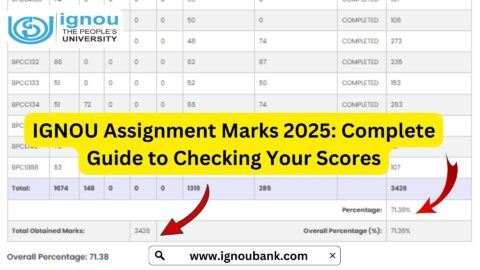
IGNOU students can check their assignment marks and evaluation status online through the official assignment-status portal. The university’s portal specifically states that the assignment, project and practical awards or marks status is reflected after the marks or grades have been transmitted by the concerned Study Centre or Regional Centre following the evaluation process.
The process is relatively simple. Students generally need to enter their enrolment number and select their programme code on the portal.
Important IGNOU Assignment Result Links and Information
| Information | Details |
|---|---|
| Assignment Result/Status | https://isms.ignou.ac.in/changeadmdata/StatusAssignment.asp |
| University | Indira Gandhi National Open University |
| Information Available | Assignment/Project/Practical Awards/Marks Transmission Status |
| Required Detail | IGNOU Enrolment Number |
| Programme Information | Programme Code |
| Status Availability | After marks/grades are transmitted by the Study Centre/Regional Centre |
| Assignment Downloads | https://www.ignou.ac.in/studentService/download/assignments |
| IGNOU Official Website | https://www.ignou.ac.in/ |
| IGNOU Term-End Result | https://termendresult.ignou.ac.in/ |
| IGNOU Grade Card | https://www.ignoubank.com/ignou-grade-card/ |
What Is IGNOU Assignment Result?
The IGNOU assignment result refers to the marks or grades awarded to students for assignments submitted as part of their programme requirements. Assignments form an important component of the academic process for many IGNOU programmes.
Once students submit their assignments to the appropriate Study Centre or through the applicable submission process, the assignments go through evaluation. After evaluation, the relevant marks or grades need to be transmitted into the university’s system.
Students can then use the assignment-status portal to check whether their assignment-related marks or grades have been updated.
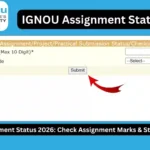
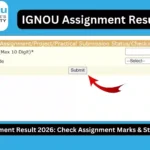
The official assignment-status page identifies the service as Assignment/Project/Practical Awards/Marks Transmission Status. It also explains that the status is reflected only after marks or grades are transmitted by Study Centres or Regional Centres following evaluation.
Therefore, students should understand that the assignment-status portal may not immediately show marks after they submit an assignment.
Where to Check IGNOU Assignment Result?
Students can check the assignment result and status through the official IGNOU assignment-status portal:
https://isms.ignou.ac.in/changeadmdata/StatusAssignment.asp
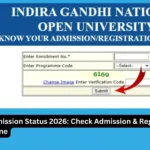
The portal provides fields for entering the enrolment number and selecting the programme code.
It is advisable to use the official portal when checking assignment information rather than relying on unofficial websites.
How to Check IGNOU Assignment Result Online?
Checking the IGNOU assignment result is a straightforward process. Follow these steps.
Step 1: Visit the Official Assignment Status Portal
Open the following link in your browser:
https://isms.ignou.ac.in/changeadmdata/StatusAssignment.asp
This is the IGNOU page for checking the transmission status of assignment, project and practical awards or marks.
Step 2: Enter Your Enrolment Number
The portal asks students to enter their Enrolment No. The page indicates that the enrolment number can be a maximum of 10 digits.
Enter your enrolment number carefully.
Make sure that there are no unnecessary spaces or incorrect digits.
Step 3: Select Your Programme Code
After entering the enrolment number, select your programme code from the available options.
The programme code should correspond to the programme in which you are enrolled.
For example, IGNOU has different programme codes for its undergraduate, postgraduate, diploma and certificate programmes. Students should select the code applicable to their own programme.
Step 4: Submit the Details
After entering your enrolment number and selecting the programme code, proceed according to the instructions displayed on the page.
The system can then display the available assignment, project or practical marks/status information associated with your student record.
Step 5: Check the Assignment Information
Review the information displayed on the screen.
Depending on the availability of the data, you may be able to see information related to assignment marks or the transmission status of assignment, project or practical awards.
If the marks are not displayed, this does not automatically mean that your assignment was not submitted.
IGNOU explains that the status is reflected after the marks or grades have been transmitted by the relevant Study Centre or Regional Centre after evaluation.
Why Are IGNOU Assignment Marks Important?
Assignments can be an important component of the academic evaluation process for IGNOU students. Students should therefore take assignment submission and evaluation seriously.
Assignment marks can contribute to the overall academic record according to the rules applicable to the student’s programme and course.
Students should maintain records of their assignment submissions, including submission receipts, acknowledgements, screenshots or other available proof.
These records can be useful if a student later needs to follow up regarding an assignment that does not appear in the university system.
When Does IGNOU Assignment Result Get Updated?
One of the most common questions students have is when their assignment marks will appear online.
There is no reason to assume that the marks will appear immediately after submitting an assignment.
The official IGNOU assignment-status page clearly states that the status will be reflected only when marks or grades are transmitted by Study Centres or Regional Centres after the evaluation process.
This means there can be a gap between:
- Assignment submission
- Assignment receipt or acknowledgement
- Assignment evaluation
- Transmission of marks or grades
- Online reflection of the marks/status
Therefore, students should allow the university’s evaluation and data-transmission process to take place.
What If IGNOU Assignment Result Is Not Showing?
Students may sometimes visit the assignment-status portal and find that their marks are not displayed.
There can be several reasons for this.
Assignment Is Still Under Evaluation
The assignment may have been submitted but not evaluated yet.
Until the evaluation process is completed and the marks or grades are transmitted, the online status may not be updated.
Marks Have Not Been Transmitted
IGNOU’s official portal specifically states that the status is reflected after marks or grades are transmitted by the Study Centre or Regional Centre.
Therefore, an assignment can potentially have been evaluated while the online information is still awaiting transmission or updating.
Assignment Submission Information Is Still Being Processed
The university receives assignment-related information through its academic and regional structures. Processing and updating can take time.
Students should therefore avoid assuming that a missing online entry automatically means that their assignment has been rejected.
Incorrect Details Entered
Make sure that you enter the correct enrolment number and programme code.
An incorrect enrolment number or programme selection can prevent you from finding the expected information.
How to Check IGNOU Assignment Marks?
To check assignment marks, students should use the official assignment-status page:
https://isms.ignou.ac.in/changeadmdata/StatusAssignment.asp
The page provides fields for the enrolment number and programme code.
After submitting the required information, carefully check the displayed result.
Students should save a screenshot or other record of their assignment information if they need it for future reference.
IGNOU Assignment Result and Grade Card
Students should also understand the difference between the assignment-status page and the overall grade card.
The assignment-status portal is specifically designed to show assignment, project and practical awards or marks transmission information.
The IGNOU grade card provides a broader academic record and may contain information about different components of a student’s programme.
Students looking for their overall academic performance can check the relevant grade-card service in addition to the assignment-status portal.
For assignment-related information, however, students should first use the official assignment-status page:
https://isms.ignou.ac.in/changeadmdata/StatusAssignment.asp
IGNOU Assignment Result and Term-End Examination Result
The assignment result should not be confused with the IGNOU Term-End Examination result.
IGNOU students generally deal with multiple academic components, including assignments and term-end examinations.
The assignment-status portal is intended for assignment, project and practical awards/marks transmission status, while the Term-End Examination result is available through the result system.
Students can check the IGNOU Term-End Examination result through:
https://termendresult.ignou.ac.in
It is useful to check both sources when reviewing your academic progress.
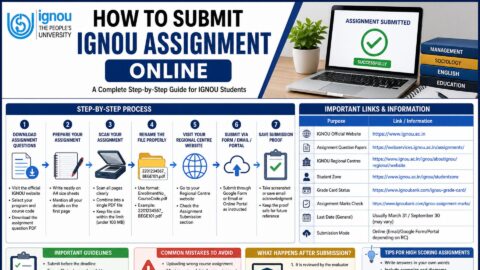
How to Download IGNOU Assignments
Students who need to download current assignments can use the assignment section provided on the IGNOU website:
https://www.ignou.ac.in/studentService/download/assignments
Before working on an assignment, students should check the applicable programme and course code.
Using the correct assignment is important because different courses have different assignment questions and requirements.
Students should also follow the submission instructions applicable to their Study Centre, Regional Centre or programme.
What Should Students Do After Assignment Submission?
After submitting an IGNOU assignment, students should keep proof of submission.
Depending on the submission method, useful records may include:
- Assignment submission receipt
- Online submission confirmation
- Screenshot
- Email confirmation
- Study Centre acknowledgement
- Submission date
- Course code
- Assignment file or copy
Keeping these records can be useful if there is a delay in the online update.
Students should also periodically check the assignment-status portal.
Tips for Checking IGNOU Assignment Result
Keep Your Enrolment Number Ready
The enrolment number is required on the assignment-status page. Keep it available whenever you check your assignment information.
Select the Correct Programme Code
Make sure the programme code corresponds to your IGNOU programme.
Check the Portal Periodically
If your marks are not initially visible, check the portal again later.
Keep Submission Proof
Do not discard your assignment submission receipt or acknowledgement.
Check Your Grade Card Too
Students should review their grade card when they need a broader view of their academic record.
Do Not Panic About a Delayed Update
A delay in online reflection does not automatically mean that an assignment has not been submitted. IGNOU’s official page explains that the status appears after marks or grades are transmitted following evaluation.
Important IGNOU Student Links
| Student Service | Link |
|---|---|
| IGNOU Assignment Result/Status | https://isms.ignou.ac.in/changeadmdata/StatusAssignment.asp |
| Download IGNOU Assignments | https://www.ignou.ac.in/studentService/download/assignments |
| IGNOU Official Website | https://www.ignou.ac.in/ |
| IGNOU Term-End Result | https://termendresult.ignou.ac.in/ |
| IGNOU Grade Card | https://www.ignoubank.com/ignou-grade-card/ |
Students should use the appropriate portal depending on the information they want to check. The assignment-status portal is specifically relevant when checking assignment, project and practical marks or their transmission status.
FAQ about IGNOU Assignment Result 2026
What is the IGNOU assignment result?
The IGNOU assignment result refers to the marks or grades related to assignments submitted by students. The assignment-status portal also covers project and practical awards or marks transmission status.
Where can I check my IGNOU assignment result?
You can check it through the official IGNOU assignment-status portal:
https://isms.ignou.ac.in/changeadmdata/StatusAssignment.asp
What details are required to check the IGNOU assignment result?
The portal asks for your enrolment number and programme code. The official page specifies an enrolment number of up to 10 digits.
Why is my IGNOU assignment result not showing?
Your assignment marks may not have been evaluated or transmitted yet. IGNOU states that the status is reflected after marks or grades are transmitted by the Study Centre or Regional Centre following evaluation.
Does a missing assignment mark mean my assignment was rejected?
Not necessarily. A missing online entry can occur because the evaluation or transmission process has not yet been completed. Students should retain their assignment submission proof and check the portal again.
Can I check assignment marks online?
Yes. IGNOU provides an online portal for checking assignment, project and practical awards/marks transmission status.
Is the assignment result the same as the IGNOU Term-End Examination result?
No. Assignment marks/status and Term-End Examination results are separate academic records and are accessed through different services.
What should I do if my assignment marks remain unavailable?
First, verify that you entered the correct enrolment number and programme code. If the information remains unavailable after the relevant evaluation and processing period, students should follow the appropriate IGNOU or Regional Centre instructions for raising the issue.
Conclusion
The IGNOU assignment result is an important part of the academic information that students need to monitor after submitting their assignments. IGNOU provides an online portal where students can check the transmission status of assignment, project and practical awards or marks.
To check your assignment result or status, visit the official portal:
https://isms.ignou.ac.in/changeadmdata/StatusAssignment.asp
You generally need to enter your enrolment number and select your programme code.
Students should remember that assignment marks may not appear immediately after submission. The official portal states that the status is reflected after marks or grades are transmitted by the Study Centre or Regional Centre following the evaluation process.
Therefore, students should keep their assignment submission proof, regularly check the official portal and review their academic records when updates become available. Using official IGNOU websites for assignment, examination and result-related information can also help students avoid relying on outdated or incorrect information.